Lift native ETH to Voucher Ledger
Move ETH to the Voucher Ledger from Ethereum.
Use the Lifting Dapp
The LIFTING DAPP is an easy-to-use tool for lifting ETH from Ethereum to Voucher Ledger. No need to interact directly with smart contracts.
Lift manually
Go through the motions of interacting with the Ethereum smart contract manually.
- Step 1
- Step 2 - Lift ETH
- Step 3 Confirmation
Go to eth-converter and enter the amount of whole ETH to be lifted as Ether.
Copy the resultant Wei value.
- Go to the VL contract
- Click
Connect to Web3and follow the guide below.
Connecting your Wallet to the Smart Contract
- ✅ Metamask browser extension.
- ✅ Metamask mobile wallet app.
When using Metamask mobile you would have to use it's integrated browser to access the contracts in this guide. So copy the links to the contracts from this page and paste them into the integrated browser in the Metamask mobile app.
Ensure your Metamask is currently pointing to the correct account i.e. the account that holds ETH and that the network is currently set to Ethereum mainnet.
Interacting with the Smart Contract
Go to the VL contract.
-
Click
Connect to Web3(ensuring your Metamask is currently pointing to the correct account i.e. the account that holds ETH) -
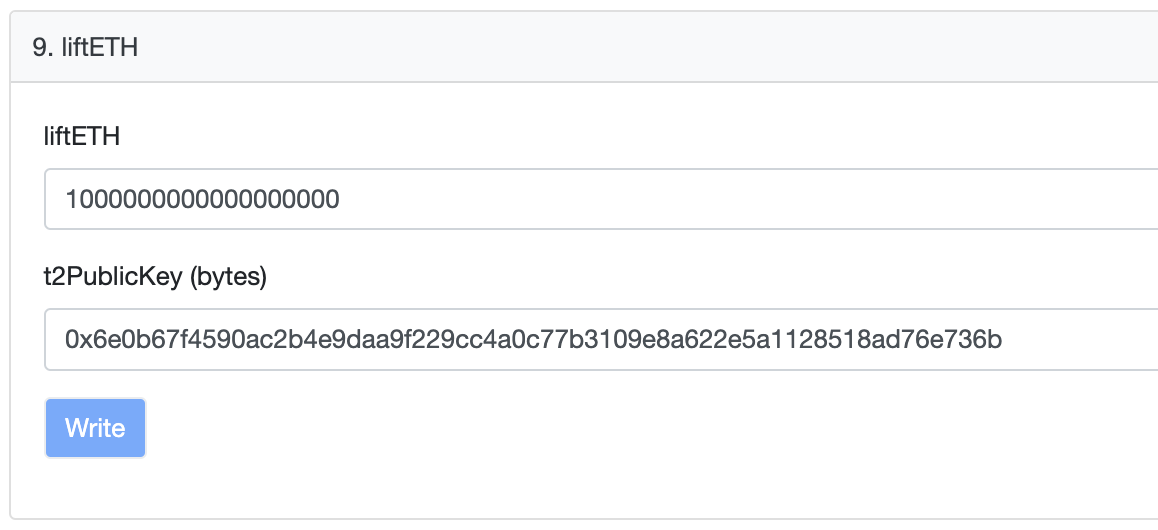
Expand method 9. liftETH and enter:
-
liftETH: The resultingweinumber from step 1 i.e. the amount of your ETH balance you would like to lift to the Voucher Ledger. -
t2PublicKey: The public key (NOT the address) of the VL account you’re lifting to. If you're using the wallet, the public key of your Voucher Ledger address can be found in the wallet. -
Click
Writeand Confirm the transaction in Metamask.
The below image is an example
Save the transaction hash
After 10 minutes go to the VL Explorer. Put the t2PublicKey value in the search bar and you should see your new balance reflected there. Ensure you are on the mainnet tab of the explorer.